Why use Agent-Up?
Trying a new development tool is a tax. You have to install it, configure it, learn another workflow, and accept the risk that it may change. For most developers, that cost is not worth paying just because a tool makes one coding agent slightly more convenient.
If you use one agent at a time, run one version of your application, and review one large diff at the end, your existing workflow is probably enough. Git, your IDE, your terminal, and your normal app commands already cover most of what you need.
Problem 1: Parallel runtimes
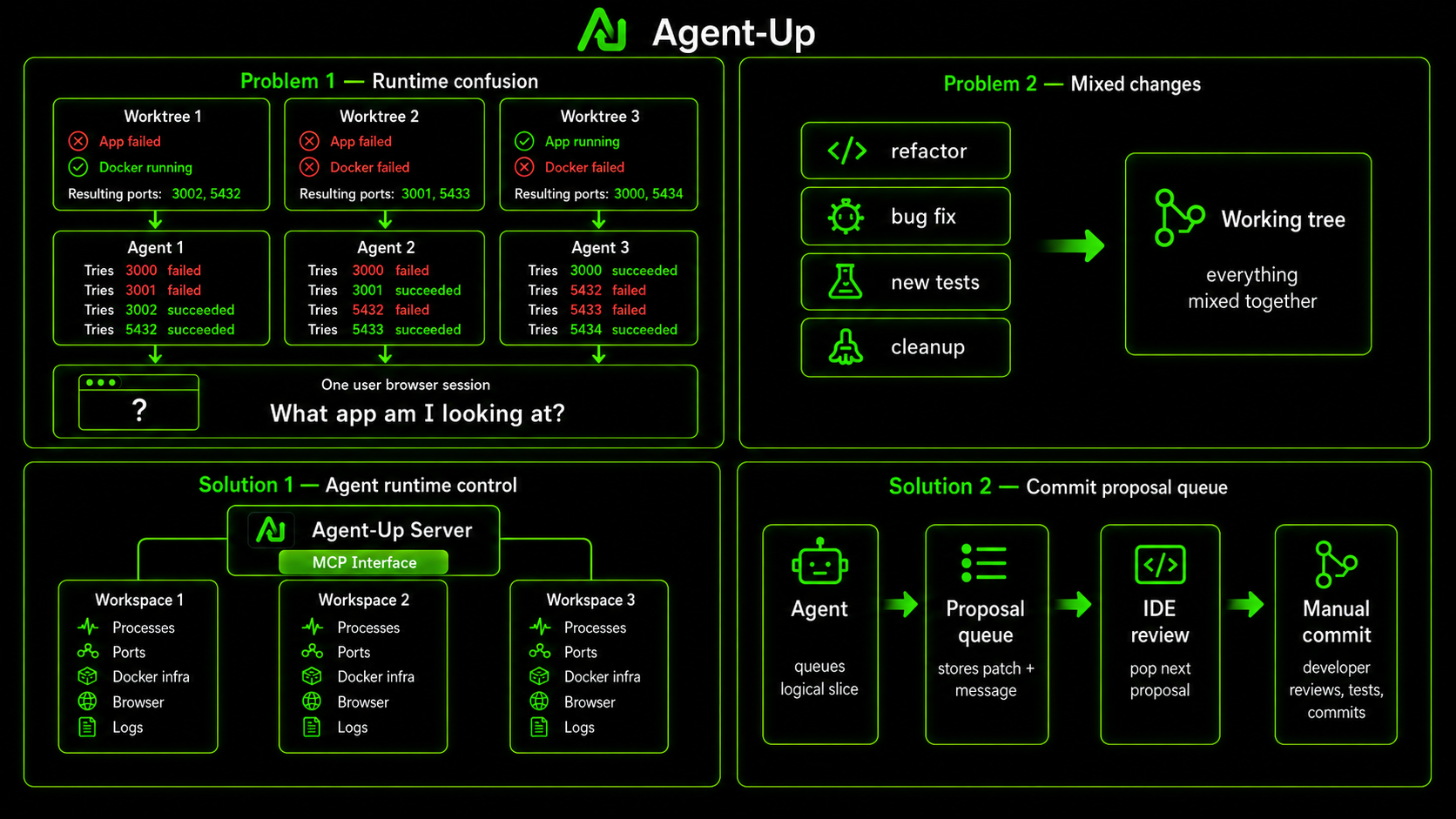
The problem starts when agent work becomes parallel. One agent fixes login, another changes checkout, and a third updates the admin page. Git worktrees can keep the files separate, but they do not keep the running applications separate. You still have to know which backend a browser tab is using and whether two workspaces tried to start infrastructure on the same ports.
That runtime confusion is subtle because the source code can be correct while the thing you are reviewing is not. An agent may have changed the right files, but your browser may still be connected to an older process or another agent's workspace. At that point the review is not just inefficient. It is unreliable.
Solution: Agent up runtime control
Agent-Up gives each worktree a managed runtime. A workspace gets its own application processes, allocated ports, Docker infrastructure, browser profile, logs, and runtime status. Agents can start and stop that workspace through MCP, while the developer reviews the running results from one desktop app.
Problem 2: Mixed commits
Running the correct application solves only half the problem. The second problem appears when the agent finishes coding. A normal task rarely produces one clean change. It may contain a refactoring, a bug fix, new tests, and an unrelated cleanup the agent noticed along the way.
Without a boundary, those changes remain mixed in the working tree. The agent can commit them directly, but then the agent controls Git history. The developer can untangle everything manually, but then much of the promised productivity disappears.
Solution: Isolated commit proposals
That is why Agent-Up is expanding beyond runtime management. Agents can prepare commit proposals through MCP. Each proposal preserves the patch, affected files, proposed commit message, and relevant test commands. The agent can inspect the queue, assign files, edit proposals, restore entries, and verify that unfinished work is not accidentally mixed into the next task.
The important boundary is that the agent still does not create the commit. The developer applies one proposal at a time, reviews the staged diff in the IDE, runs the relevant tests, and commits it manually. Git history remains under human control.
Incremental Agent-Up adoption
This creates a clearer division of responsibility. Git isolates the source, Agent-Up isolates the runtime, MCP lets agents operate that runtime, MCP also lets agents prepare reviewable commit proposals, the IDE handles the final diff review, and the developer controls the Git history.
Adoption remains deliberately limited. For runtime isolation, install the Agent-Up server, add an agent-up.json, and connect your agents to its MCP server. For commit proposals, connect your agents to the commit queue MCP tools and optionally install the JetBrains plugin for one-click staged review.
You can also use only the parts that fit your workflow. Keep your existing application commands, Docker services, IDE, and Git process. Agent-Up does not add an application framework dependency, and you do not need to containerize the entire app.
Long term vision
Agent-Up is still a development preview, so taking that risk only makes sense when the alternative is repeatedly reconstructing runtime state, untangling mixed changes, and hoping the application and diff you are reviewing actually belong together.
The value is not making one coding agent slightly more convenient. It is creating a controlled handoff between several agents and one accountable developer.
Download Agent-Up: